





Blog / Chevy Technology Smart Phone

Blog

All Chevy Technology Smart Phone Park Hills Chevrolet Dealer Park Hills Chevrolet Park Hills Chevrolet Service Park Hills Chevy Loan Park Hills Chevy SUV Park Hills Used Cars Auto Loans in Farmington MO Chevy SUV Park Hills SUV Best Chevy SUVs Car Financing in Farmington Farmington Chevy Dealership Farmington Chevy Dealer New Chevy Warranty Chevy Compact SUV New Chevy Trucks Park Hills Chevy Lease Car Maintenance Park Hills Trucks 2025 Chevy SUVs New Chevrolet Warranty 2026 Chevy SUVS Chevrolet Maintenance Chevy Trax Park Hills Chevy Test Drive Park Hills Chevy Trax Park Hills EV SUV 2024 Chevrolet Warranty 2025 Chevy Tech Chevy EV Chevy Safety Features Chevy Silverado 1500 Farmington Chevy Lease Farmington Chevy Loan New Chevy Blazer EV Park Hills Food 2022 Chevrolet Blazer 2022 Chevy Trax 2024 Chevy Blazer 2024 Chevy Warranty 2025 Chevy Features 2025 Chevy Technology 2026 Small SUVS Activities Near Park Hills, MO Chevy Silverado 2500 Chevy Tires in Farmington Chevy Tires in Park Hills Chevy Trax Features New Chevy Trax New Trax Park Hills Chevy Blazer Park Hills Chevy Equinox Park Hills Chevy Traverse Park Hills Chevy Trucks Park Hills Hybrid SUV Park Hills Trax Park Hills Used Trucks Service and Repairs St. Louis Chevy Dealer St. Louis Chevy Dealership 2022 Chevy Equinox 2024 Chevy Trax 2026 Chevrolet Vehicles Best Food in Farmington Chevy Blazer EV Chevy Essential Maintenance Chevy Finance Department Park Hills Chevy Trax Trim Levels New Chevy Silverado 2500 HD New Chevy Tahoe New Chevy Traverse Park Hills Chevrolet Blazer EV Park Hills Chevy Silverado 1500 Park Hills Chevy Silverado 2500 HD Park Hills Chevy Tahoe Sandwich Shops in Farmington St. Louis Chevy Loan 2024 Chevrolet Blazer EV 2024 Chevy Silverado 2500 HD 2026 Chevy Traverse 2026 Chevy Trax Chevy Brakes in Farmington Chevy Brakes in Park Hills Chevy Colorado Chevy Finance Department Farmington Chevy Maintenance Chevy Tire Rotation Chevy Tires Chevy Trailblazer Farmington Chevy Trucks New Chevrolet Silverado 1500 New Chevy Equinox Park Hills Chevy Colorado Park Hills Chevy Service Center Park Hills Chevy Silverado 2500 Park Hills Chevy Trailblazer 2024 Chevrolet Silverado 1500 2024 Chevy Equinox 2024 Chevy Tahoe 2024 Chevy Trucks 2025 Chevy Equinox 2025 Chevy Tahoe 2025 Chevy Trucks 2025 EV SUVs 2026 Chevy Colorado 2026 Chevy Equinox 2026 Chevy Tahoe 2026 Chevy Trucks 2026 Chevy Trucks Park Hills Best 2026 SUVs Car Winterization Park Hills Chevy Equinox Chevy Oil Change Chevy Tahoe vs. the Chevy Traverse Farmington Chevy Blazer Farmington Chevy Traverse Farmington Tire Rotation New Chevrolet Blazer EV New Chevy Blazer New Chevy Silverado 1500 New Chevy Trailblazer New Tires in Farmington New Tires in Park Hills Oil Change in Farmington Oil Change in Park Hills Park Hills Brake Repair Park Hills Brake Replacement Park Hills Tire Rotation Park Hills Trailblazer Shopping in Park Hills Things to do in Park Hills 2025 Chevrolet Trax 2025 Chevy Blazer 2025 Chevy EV SUVs 2025 Chevy Tahoe Features 2025 Chevy Tahoe vs. the Chevy Traverse 2025 Chevy Traverse 2026 3-row SUV 2026 Chevy Equinox VS 2026 Chevy Trailblazer 2026 Chevy Suburban Auto Winterization Park Hills Best 2025 3-row SUV Best 2025 Large SUV Best 2026 Chevy SUVs Boutiques Near Park Hills Chevy Battery Chevy Battery Park Hills Chevy Lease VS. Buy Farmington Chevy Colorado Farmington Chevy Equinox EV Farmington Chevy Silverado 2500 HD Farmington Chevy Suburban Farmington Chevy Tahoe Farmington Tire Shop Local Area New Chevy Compact Trucks New Chevy Tahoe vs. the Chevy Traverse New Chevy Technology New Trailblazer Park Hills 2025 Chevy Equinox Park Hills Car Battery Park Hills Car Battery Service Park Hills Chevy Equinox EV Park Hills Chevy Suburban Park Hills Luxury Cars Park Hills New Trucks For Sale Park Hills Oil Change Used Chevy Tires 2024 Best Sports Cars 2024 Chevy Colorado 2024 Chevy Corvette Stingray 2024 Chevy Trailblazer 2024 Chevy Traverse 2024 Chevy Traverse Trim Levels 2024 Corvette Stingray 2025 Chevy Blazer EV 2025 Chevy Colorado 2025 Chevy Equinox EV 2025 Chevy Silverado 2500 HD 2025 Chevy Silverado 3500 HD 2025 Chevy Suburban 2025 Chevy Traverse Cargo Space 2025 Small Trucks 2026 Best Compact Trucks 2026 Chevrolet Silverado 1500 2026 Chevrolet Silverado 1500 Park Hills 2026 Chevrolet Silverado 2500 HD 2026 Chevy Colorado Trim Levels 2026 Chevy Corvette Z06 2026 Chevy Google Gemini 2026 Chevy Silverado 2500 HD 2026 Fuel-Efficient Chevy SUV 2026 Trucks Best For Winter CarFax 1-Owner Vehicles Farmington CarFax 1-Owner Vehicles Park Hills Chevy App Chevy Blazer Chevy Bolt Chevy Corvette Z06 in Park Hills Chevy Electric Lease Chevy Fluid Maintenance Chevy Fluid Park Hills Chevy Headlights Chevy Malibu Chevy OnStar Chevy Silverado EV Chevy Suburban Park Hills Chevy Summer Maintenance Tips Chevy Tahoe Park Hills Chevy Traverse in Park Hills Chevy Winterization Park Hills Chevy Youth Sports Custom Order Chevy Corvette Farmington Chevy Corvette Z06 Gateway Grizzlies How to connect Android Auto™ to your Chevy How to connect Apple CarPlay® to your Chevy Missouri 2025 Chevy Equinox MO New 2025 Heavy Duty Trucks New Chevy Colorado New Chevy Corvette Stingray New Chevy Corvette Z06 New Chevy Google Gemini New Chevy Silverado 3500 HD New Chevy Small Trucks New Chevy Suburban New Chevy Traverse Space Park Hills Auto Headlights Park Hills Baseball Camps Park Hills Car Battery Replacement Park Hills Chevy Corvette Park Hills Chevy Corvette Stingray Park Hills Chevy Headlights Park Hills Chevy Silverado 3500 HD Park Hills Kids Summer Camps Park Hills MI Chevrolet Inventory Park Hills Softball Camps Park Hills Sports Cars Park Hills Youth Baseball Park Hills Youth Softball Park Hills Youth Sports Signs you need a new Chevy Battery Signs your car needs new Headlights Signs Your Chevy Needs An Oil Change St. Louis Chevy Colorado St. Louis Chevy Corvette Z06 St. Louis Chevy Equinox EV St. Louis Chevy Silverado 2500 HD St. Louis Chevy Silverado 3500 HD St. Louis Chevy Trucks Tahoe vs. the Traverse When to tell that you need new tires When to tell you need a tire rotation Winterization Tips For Your Chevy
chevy screen 09 (24)

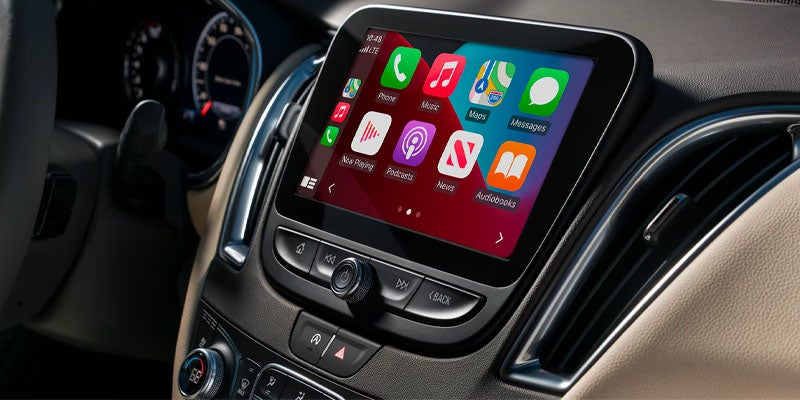
Seamlessly Connect Your Smartphone with Your Chevy: A Guide to Android Auto™ and Apple CarPlay®

With the rise of advanced automotive technology, staying connected while on the road has become easier than ever. Thanks to features like Android Auto™ and Apple CarPlay®, you can seamlessly integrate your smartphone with your vehicle’s infotainment system, giving you access to calls, navigation, music, and more—all without taking your hands off the wheel. At Park Hills Chevrolet in Park Hills, MO, we’ve created this guide to help you connect Android Auto™ and Apple CarPlay® to your Chevy for a safer and smarter driving experience. Android Auto™ If your Chevy supports Android Auto™, you can access various features of your Android phone through your vehicle’s infotainment system, including: Making and receiving calls Using Google Maps™ for turn-by-turn navigation Playing music from your favorite apps Accessing hands-free help with Google Assistant™ How to Connect Android Auto™ via USB Park Your Vehicle: Ensure that your car is parked before you begin. Connect Your Phone: Use your phone’s USB cable to connect to the USB data port in your car. We recommend using the USB cable that came with your phone to avoid any connection issues. Install the App: If you haven’t already, download the Android Auto™ app from the Google Play Store. You may also need to update apps such as Google Maps. Launch Android Auto™: If the app doesn’t open automatically, tap the Android Auto™ icon or Projection icon on your vehicle’s touchscreen. Follow On-Screen Instructions: Accept the terms and conditions and follow the prompts on both the vehicle’s screen and your phone. Access Android Auto™: Once connected, your phone’s apps will appear on the infotainment screen. How to Connect Android Auto™ Wirelessly Ensure Your Vehicle is Parked: Make sure your vehicle is parked before starting. Download Android Auto™: If you haven't done so, download the Android Auto™ app from the Google Play Store and update any necessary apps. Connect via Bluetooth®: Tap the Android Auto™ icon on your Chevy’s screen and pair your phone with the car using Bluetooth®. Accept the Connection: Follow the on-screen instructions on both your phone and the vehicle. Start Using Android Auto™: Once the connection is made, you can use Android Auto™ wirelessly. Apple CarPlay® Apple CarPlay® allows you to integrate your iPhone with your Chevy’s infotainment system, enabling access to apps, calls, messages, navigation, and music—all with the help of Siri®. How to Connect Apple CarPlay® via USB Connect Your iPhone: Use a Lightning cable (USB-A or USB-C depending on your model) to connect your iPhone to your car’s USB data port. Unlock Your iPhone: Make sure your iPhone is unlocked before connecting. Enable Apple CarPlay®: A prompt will appear to enable Apple CarPlay®. Follow the on-screen instructions to proceed. Launch Apple CarPlay®: If it doesn't automatically open, press the Apple CarPlay® icon on the screen. Access Your Apps: After activation, the compatible apps from your iPhone will be displayed on your vehicle’s screen. How to Connect Apple CarPlay® Wirelessly Pair via Bluetooth®: In your car’s infotainment system, connect your iPhone to Bluetooth®. Start the Wireless Connection: Follow the prompts on both your iPhone and the vehicle’s screen to begin the wireless connection process. Accept the Terms: Agree to the Terms of Use if prompted. Note: Wireless Apple CarPlay® is available on select vehicles and iPhones. If you’ve previously connected your iPhone via Lightning cable, you can enable wireless CarPlay® for future use. Exiting Apple CarPlay® To exit Apple CarPlay®, simply press the “Home” button. To return to Apple CarPlay®, press and hold the “Home” button or tap the Apple CarPlay® icon on your screen. Troubleshooting and Assistance If you encounter any issues connecting Android Auto™ or Apple CarPlay®, or need assistance with any other tech features, our team at Park Hills Chevrolet is here to help. Book a service appointment with us, and we’ll guide you through any troubleshooting steps and answer any questions you may have. Explore Chevy’s Technology at Park Hills Chevrolet Looking for a new car, SUV, or truck with the latest in connectivity features? Visit Park Hills Chevy in Park Hills, MO. Our showroom offers a wide selection of vehicles equipped with Android Auto™ and Apple CarPlay®, along with user-friendly infotainment systems. Our team is ready to show you the latest Chevy technology, answer your questions, and help you find the perfect vehicle. Stop by today for a test drive and experience the future of driving with us.
Contact Us

Fill out this form below and we'll contact you shortly
*Required Fields